30 May 2008

[Tutorial] Screenshot Menggunakan MPC

**Nih adalah tutorial yang saya buat di Forum PERUBATANonline dan dikemaskinikan lagi di Forum iLuvIslam**

Salam,
Oleh kerana ini bukan tutorial Photoshop jadi saya letakkan di sini. Boring gak asyik tutorial Photoshop kan? Kesian kat manusia yang tak reti Photoshop di luar sana. Huhu.

Okeh introduction kejap,
Ramai yang download bermacam-macam software untuk play file video, tapi tak ramai yang tahu bahawa software seringkas Media Player Classic boleh buat lebih daripada sekadar 'Play Video'.

Untuk yang pertama nih, saya akan terangkan camne nak amik screenshot daripada video untuk korang guna dalam blog korang, atau buat avatar, atau buat testi, atau buat pape je laa.. termasuklah superimpose, hehe

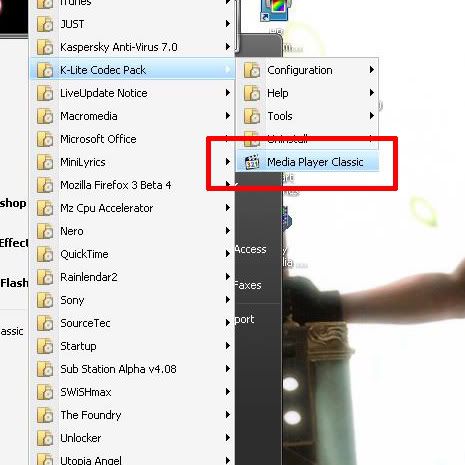
Bagi mereka yang takde Media Player Classic, saya cadangkan gunakan K-Lite Mega Codec Pack. Boleh play hampir semua jenis file termasuklah RMVB dan MOV serta FLV.

Model tutorial ini adalah Drama Korea: Surgeon Bong Dal Hee.


1-bukak Media Player Classic


2-View>>Options


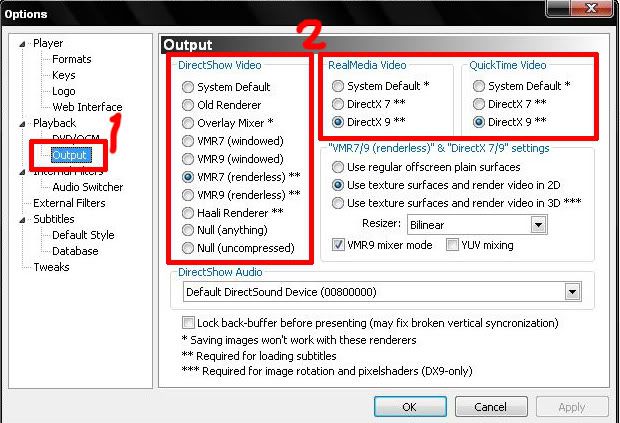
3-Kat bahagian KIRI, pilih OUTPUT

4-Tukar setting kepada berikut:
DirectShow Video
VMR 7 (windowed) atau VMR 7 (renderless), pilih yang mana dirasakan seswai. kalau video jd jem atau pape masalah berlaku, tukar yang satu lagi.


ini optional:
RealMedia Video
DirectX 7
QuickTime Video
DirectX 7


5-Klik OK.

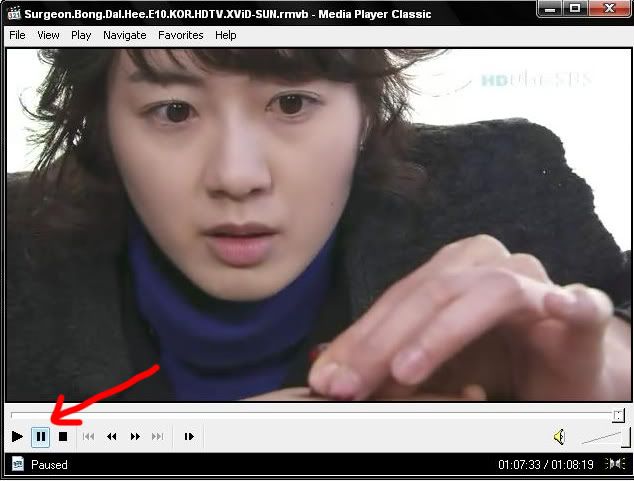
6-Play video tuh sampai laa kat part yg ko nk amik gmbar tuh, PAUSE.


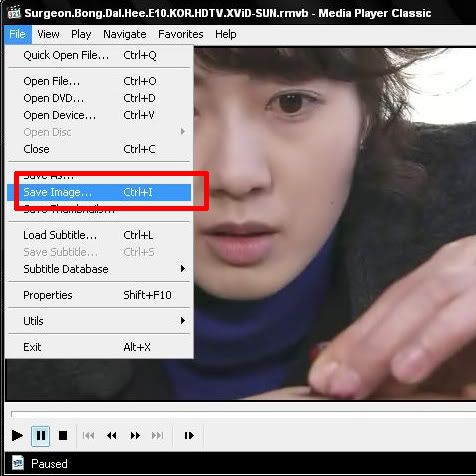
7-File>>Save Image


Okeh siap, selamat mencuba. Anda boleh edit file JPEG yang telah disave tadi menggunakan Adobe Photoshop atau pape je laa software yang anda suka.

NOTA TAMBAHAN:
1) kalau ade pape masalah utk play video, tukar balik OUTPUT td pd asal.


TUTORIAL TAMBAHAN:

hehe sambungan sikit..

Tutorial kali nih amat berguna kalau korang nak buat REVIEW filem atau video pape jelaa kat blog korang atau kat forum atau memane je.

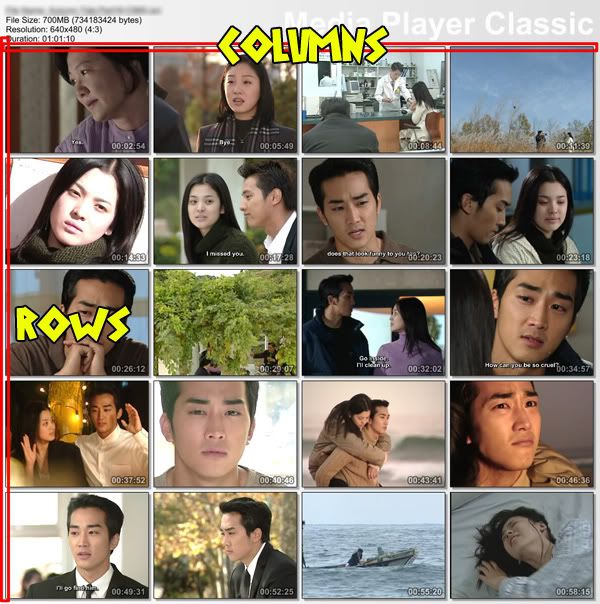
Ikut langkah 6 di atas, kemudian amik File>>Save ThumbNail


recommended setting:
5 Rows x 4 Columns
File Size 1024kB


kalau tak tahu apakah itu setting Rows & Columns, ianya adalah setting untuk menentukan bilangan gambar mengikut Rows & Columns. Ini adalah contoh hasil recommended setting iaitu 5 Rows x 4 Columns


Selamat mencuba.
Continue Reading

29 May 2008

Puaka Musim Exam Episode02 - Histo

Seperti dijanjikan! Episod dua released walaupun agak lambat - exam histo dah abes laa. Tapi jom tengok2 sekeliling sempena exam histo Semalam. Hehe.


Exam kali nih tak banyak sangat kegilaannya. Mungkin sebab ramai stadi jer. Huhu.

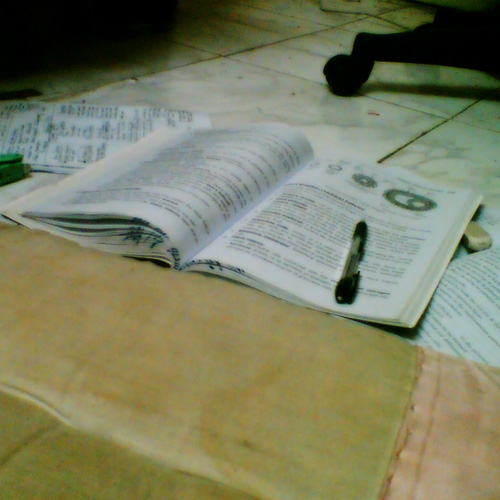
SKIL STADI


Dari atas katil, terus ke atas lantai. Rasa jubin yang sejuk, kalo tertido, mudah terjaga, lagipun sakit badan kalu tido atas lantai. Huhu.
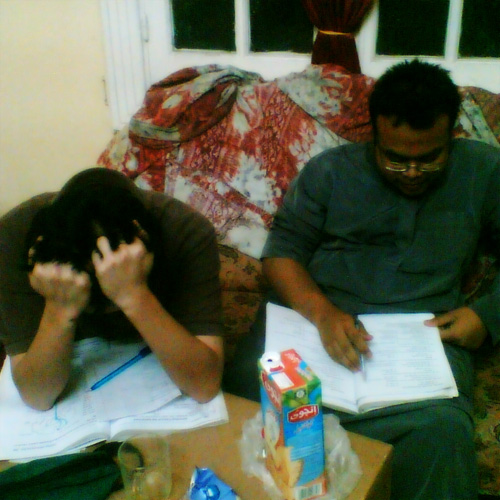
Tengok gaya stress duorang manusia di malam exam. Huhu.

GAYA MUMTAZIIN


Gaya dua orang mumtaz pada malam exam. Dua-dua abes stadi. Sorang tido awal - 2200 telah nyenyak berdengkur ditemani kipas. Sorang lagi tak abes2 cuba memecahkan rekod game dalam henset.

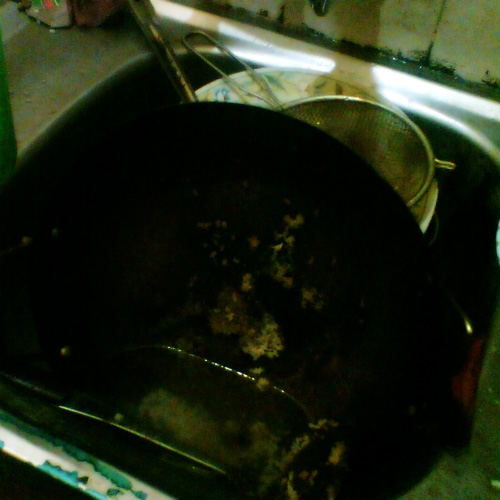
PERANGAI KEJI


Kalo dulu just cawan ngan gelas je malas basuh, mase nih, sampai ke periuk tak berbasuh seminggu. Dah berulat malah, sinnki pun tersumbat! Astaghfirullah, sape yang bertugas basuh periuk hah?! Saya laa tuh. Haha

AKIBAT STADI

Video nih pulak akibat stadi Female Genital tract yang keterlaluan. Haha.


Okeh, nantikan episod 3 - Biochem di masa akan datang.
Continue Reading

Tagged by Khairi


Tag nih agak spesel sbb kriey tag saya dengan aweknye sahaja. Kire setaraf laa sayang kriey terhadap kawan dia nih. Haha perasan kejap.

Soklan yang engko bagi nih banyak betul kriey oii. Jenuh aku nak menjawabnya.

Instructions: Remove ONE question from below, and add in your personal question, make it a total of 20 questions, then tag 8 people in your list, list them out at the end of this post. Notify them in their chat box that he/she has been tagged.


1. Do you believe in love at first sight?
Love, tak. Like, maybe.

2. Have you ever felt stupid? Why?
You'll feel stupid if you get the first place in exam for Additional Math and what you got is a bunch of kertas kajang jenama sekolah. What's more - it happened throughout the year for every exams you had.

3. Where is the place that you want to go the most?
Heaven - sama jawapan ngan ko. Sume orang Islam mahu ke syurga, walaupun perangai macam nk ke neraka - ayat keramat Ustat CK.

4. If you can have 1 dream to come true, what would it be?
Dream? My wet dream of course. Lol.

5. Do you believe in seeing a rainbow after the rain?
Yes, hardship makes us stronger.

6. Do you like being who you are today?
Asyik 'do you' jer, Terpaksa jawab 'yes'. Bcoz there's no one the same as me.

7. If you win $1 million, what would you do?
There's no such thing as winning 1 million except AF or lottery. I'll throw them out of course.

8. If you meet someone that you love, would you confess to him/her?
Confess to someone that love U, that's the best thing to do.

9. Your fav country?
Egypt, hehe.

10. What are the requirements that you wish from your other half?
Rajinkan diri, kurangkan kemalasan, tumpukan study, jangan main tenet banyak sangat.

11. Which type of cars ou love the most?
Kereta sorong sebab ianya unik - satu je tayar.

12. Please put one quote below.
Perkahwinan bukan sekadar satu tanggungjawab, nor sekadar cintan-cintun. Tapi ianya satu tanggungjawab untuk bercinta, dan rasa cinta akan tanggungjawab.
[HafizAdam]


13. If you have faults, would you rather the people around you point out to you or would you rather they keep quiet?
Point out in front of me and keep quiet behind me.

14. What do you think is the most important thing in your life?
My desktop and internet - I cant live without them.

15. Are you a shopaholic or not?
Nope. Actually I dont really used to shopping stuff, or better to say - I dont know what to buy.

16. What kind of electronic device/gadget you own that you like most?
My desktop - I mentioned that in Q14.

17. If you have a chance, which part of your character you would like to change?
Lazy to hardworking.

18. Are you a family man?
Maybe. More to family crybaby lol.

19. If given a chance, do you want to see your future?
Nope. Surprise is an essence of happy lifestyle.

20. Will u get married?
Yes, kalau ada calon. Hehe.

Tag 8 orang? Ramainya. Sume tengah pekse laa. Okeh, sesape yang baca tag nih, dan ada blog, anda unofficially telah di-tag, maka WAJIB jawab. Hehe okeh stadi biochem lak.
Continue Reading

25 May 2008

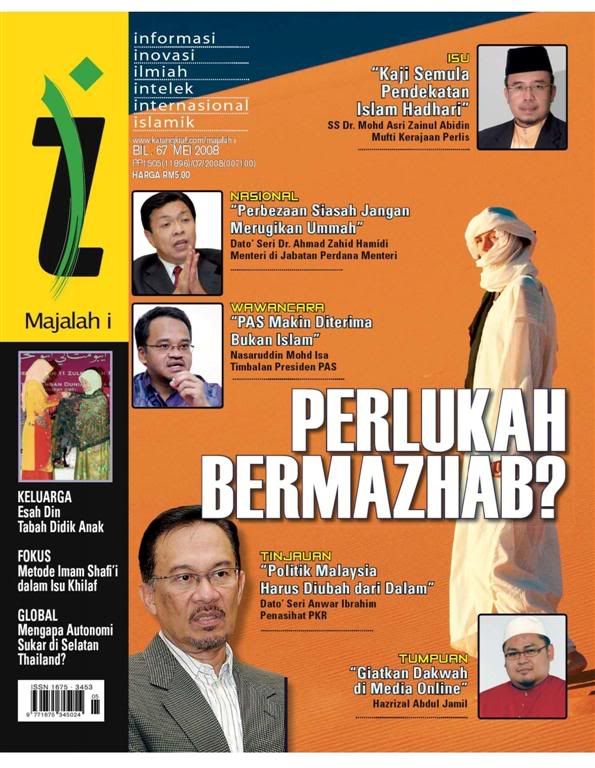
Majalah I Mei 08

Akhirnya RELEASED! Majalah I kegemaran ramai yang telah menjangkau berpuluh-puluh download sebelum ini. Thanx for waiting, enjoy it!

MAJALAH I - MEI 2008


Format: RAR, unRAR: PDF
Size: 36.70MB
Download: RapidShare


Credit to TorrentMalaya for this file. For the downloaders, DONT PUT THE DOWNLOAD LINK IN ANOTHER WEBSITE. LINK THEM TO THIS BLOG INSTEAD.I really appreciate your cooperation. If you found this mag really great, PLEASE BUY THE ORIGINAL FROM KARANGKRAF. You will help Islamic Industry by doing that.


More Majalah I DI SINI
Continue Reading

22 May 2008

Tutorial Asas Photoshop Melayu

Jenjalan sekejap memeriksa Majalah I, saya ternampak eBook ini. Pada mulanya buat tak endah je, tapi atas permintaan beberapa user di iLuvIslam, saya download jugak untuk mereka.


Official Website: LPZH
Format: RAR, unRAR: EXE
Size: 8.5MB
Download: RapidShare


Tutorial basic ini sesuai digunakan bersama Adobe Photoshop CS2 atau CS3, kepada mereka yang baru berjinak-jinak ngan Photoshop. Bagi mereka yang belum ade software ini, boleh cuba gunakan Portable Version. Klik Sini.

Ini pula menu tutorial yang ada.
01.Foto dalam Imej Pemandangan
02.Membersihkan Wajah Di Foto
03.Titisan Air Di Daun
04.Mencipta Bola Kristal
05.Teks di Lengkungan Cawan
06.Cantuman Dua Imej
07.Cantuman Beberapa Imej
08.Menukar Foto Kepada Lukisan
09.Iklan Di Kota Raya
10.Membuat Kibaran Pada Bendera
11.Imej Di Kiub
12.Bingkai Kabur Di tepi Imej
13.Selembar Album Sebagai Bingkai
14.Membina Strip Filem
15.Efek Teks Glass
16.Efek Teks Glass 2
17.Efek Teks Cermin
18.Efek Teks Mengikut Kontur
19.Mencipta Logo 1
20.Mencipta Logo 2
21.Mencipta Logo 3
22.Membina Kad Perniagaan


Boleh cuba tutorial-tutorial yang disediakan. Akhir kata, DONT PUT THE DOWNLOAD LINK IN ANOTHER WEBSITE. LINK THEM TO THIS BLOG INSTEAD.
Continue Reading
 

License

This blog by Muhammad Hafiz Adam is official website of Creative Designer and licensed under a Creative Commons Attribution-Noncommercial 2.5 Malaysia License.

You're free to Share (copying, distributing and transmitting) and to Remix (adapting the work) under the following conditions:
a) Attribution;
You must attribute the work by linking back to this blog pr anything similar (but not in any way that suggests that I endorse you or your use of the work).
b) Noncommercial;
You may not use this work for commercial purposes.

Categories

~AkuDarahAnakMalaysia~ Copyright © 2009 Community is Designed by Bie Blogger Template